
Going through a custody case without a lawyer?
A calm workspace to document what's happening, organize your evidence, and walk into your hearing with a record that holds together. Free to start. No credit card.
By Clearhavn editorial · Last updated
What you're up against
If you're representing yourself in a custody case, you're already doing the hardest part. You're reading court forms, tracking deadlines, gathering proof, and trying to remember what happened three months ago — while also raising children, working a job, and trying to hold the rest of your life together.
The work an attorney would do behind the scenes — building a chronology, organizing exhibits, drafting timelines, pulling evidence into something a judge can follow — is now on you. Most people start with a notebook or a Google Sheet. It works for a while, then it doesn't.
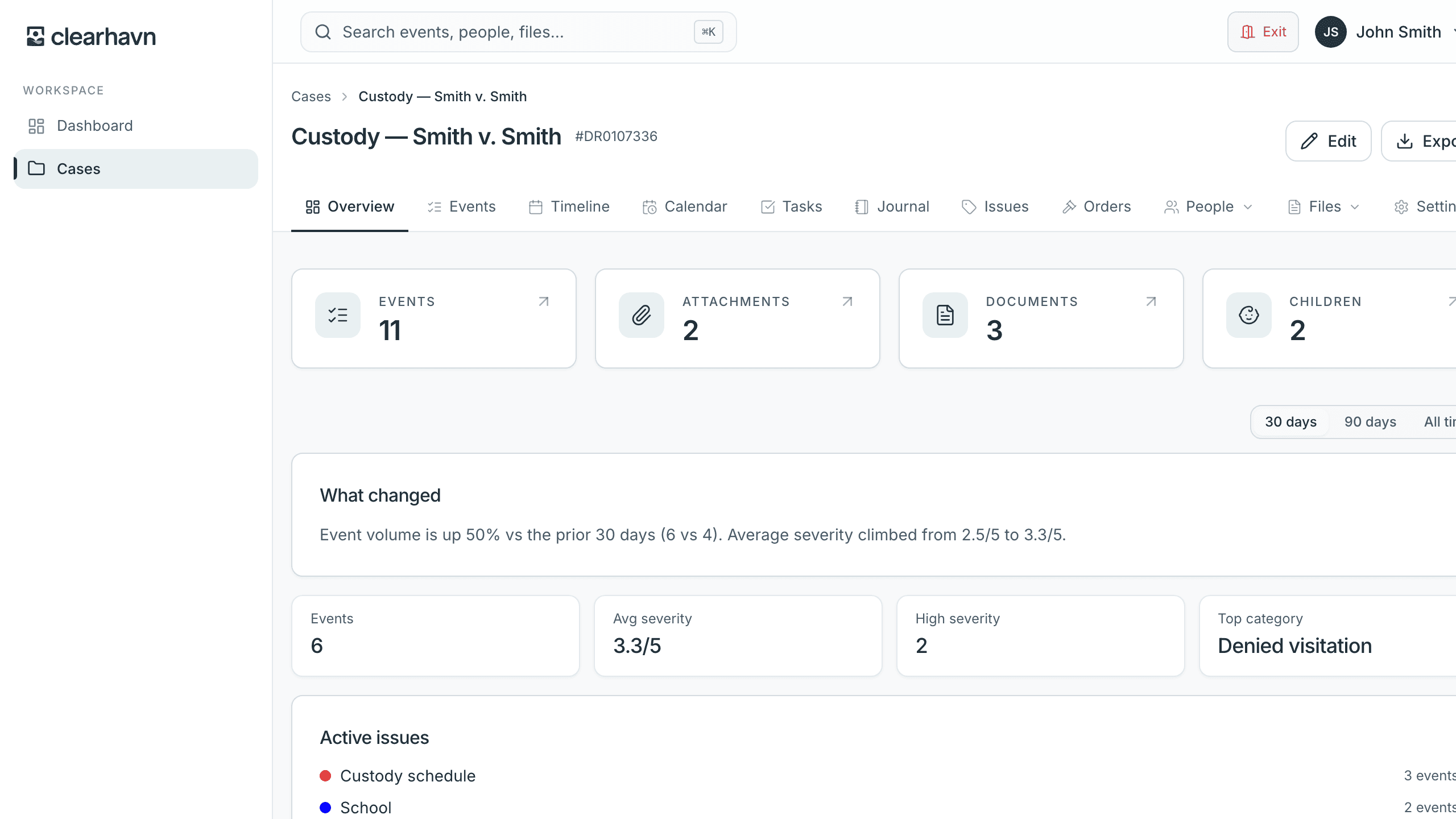
Clearhavn is built for the part of the work an attorney would normally handle for you. It's not a lawyer. It won't tell you what to argue. But it will keep your record organized so that when you walk into your hearing, you're bringing something clear instead of a folder of screenshots.
We also publish a free, browser-based family-court objection trainer. If you've ever frozen up when the other side asked an improper question, the fix is the same one trial lawyers use: pattern recognition, drilled until it's automatic.
If you're a survivor of domestic abuse, our page for DV survivors covers documentation for restraining-order petitions and DV-informed custody cases, plus the privacy features that matter most when documenting from a shared device.
What Clearhavn helps with
The organizational work an attorney would normally do for you.
Capture incidents while they're fresh
When the other parent is late to an exchange, or sends a hostile message, or your child says something that matters — log it now, on your phone, in 30 seconds. Date, time, what happened, how serious it was.
Keep evidence with the event it belongs to
Screenshots, photos, audio, PDFs of text messages, school emails — drag them onto the event they relate to. When you go to court, the photo is already attached to the right moment, not lost in your camera roll.
Get a calm reply to a hard text
When the other parent sends something that makes your stomach drop, the free Message Coach helps you draft a BIFF-style response (Brief, Informative, Friendly, Firm) in about 30 seconds — instead of firing off something you'll regret. Communication coaching, not legal advice.
Track upcoming deadlines and hearings
Court dates, exchange days, filing deadlines, school meetings. Email or push reminders before each one — set the timing yourself, from one hour to three days in advance.
See patterns instead of a list
After a few weeks, Clearhavn shows you what's actually been happening: which issues come up repeatedly, when severity is increasing, which child is most affected. Useful in court, useful for you.
Generate a court-ready chronology
When the hearing comes — or before a meeting with an attorney for review — export a clean PDF chronology: every event, organized by day, with evidence references. No formatting work on your end.
Keep it private
Your case is private by default. Panic exit and session PIN lock for moments when you need to hide quickly. If you ever decide to leave, download your full data as JSON. Nothing is shared without your control.
What Clearhavn won't do
Self-representation is hard, and we'd rather be upfront about where this tool can and can't help.
It will not give you legal advice
We can't tell you whether you have a strong case, what to argue, or what a judge will decide. Those are questions for a licensed family law attorney in your jurisdiction.
It will not write your filings or motions
We organize what happened. We don't draft legal documents. If you need help with court forms, look for a self-help center at your local courthouse — most have free clinics for self-represented parties.
It will not replace an attorney if you can afford one
If you can hire a family law attorney, you should. Even a single consultation can change how you approach your case. Clearhavn works alongside an attorney too — Pro lets you share a read-only view with them.
It will not guarantee any outcome
No tool can. What it can do is help you walk in prepared with a clear, organized record — which is most of what you can control.
How to start
- 1
Sign up free
One case is free forever. No credit card. Two minutes to set up.
- 2
Log the events you remember
Start with the most recent or most important. You can fill in older events as you go. Even five events is a useful start.
- 3
Drag evidence onto each event
Photos, screenshots, audio, PDFs — anything you have. They live with the event from now on.
- 4
Export when you need it
Before a hearing, before an attorney meeting, or any time you want a clean view — export a PDF chronology in one click. (Pro feature, $12/month, cancel anytime.)
Drill family-court objections so you don't freeze
Without an attorney, you have to make your own objections — and most pro-se litigants freeze. We built a free trainer with 40 realistic transcript scenarios (hearsay, leading, foundation, relevance, opinion/character, privilege), each with instant explanations citing the FRE rule or its state analog.
Also free: the Message Coach — calm, BIFF-style help for hard co-parent texts.
Common questions
- Will using Clearhavn help me win my case?
- We can't promise that. What it can do is help you present an organized record, which is most of what you can control as a self-represented party. The outcome of any case depends on facts, law, and the judge — not on the tools you used to prepare.
- Do I need a lawyer at all if I have this?
- Probably yes if you can afford one — even briefly. An attorney can spot legal issues you won't catch on your own. Clearhavn handles the organization and chronology work; it doesn't replace legal expertise. If you can't afford an ongoing attorney, look into limited-scope representation or your local self-help center.
- How is this different from a notebook or spreadsheet?
- A notebook works fine for a few notes. A spreadsheet works fine until the evidence (photos, screenshots, recordings) ends up in three different places and you have no clean way to export a court-ready chronology. Clearhavn keeps everything in one place and gives you a one-click PDF when you need it.
- Is it really private?
- Yes. Your case is scoped to your account. No public sharing. No analytics looking at your case data. Files are stored privately and accessed only through short-lived signed URLs. There's also a panic exit feature and session PIN lock for moments when you need to hide quickly.
- Can I cancel anytime?
- Yes. Cancel from the billing page; you keep Pro features until the end of your current billing period. Your data stays. You can also download a full export of your data as JSON anytime, even on the free plan.
- What if I lose my case anyway?
- That can happen even with the most organized record. Clearhavn helps you do the part you can control well — show up prepared. The rest is law and a judge. We're sorry. We hope it goes the other way.
Start with one event today.
You don't have to figure it all out at once. Log one incident, attach one screenshot, see how it feels. Free for one case, forever.